Track
Every application, in one place
A status pill on every job card, and a side panel that keeps every job you save, from Sent CV to Offer.
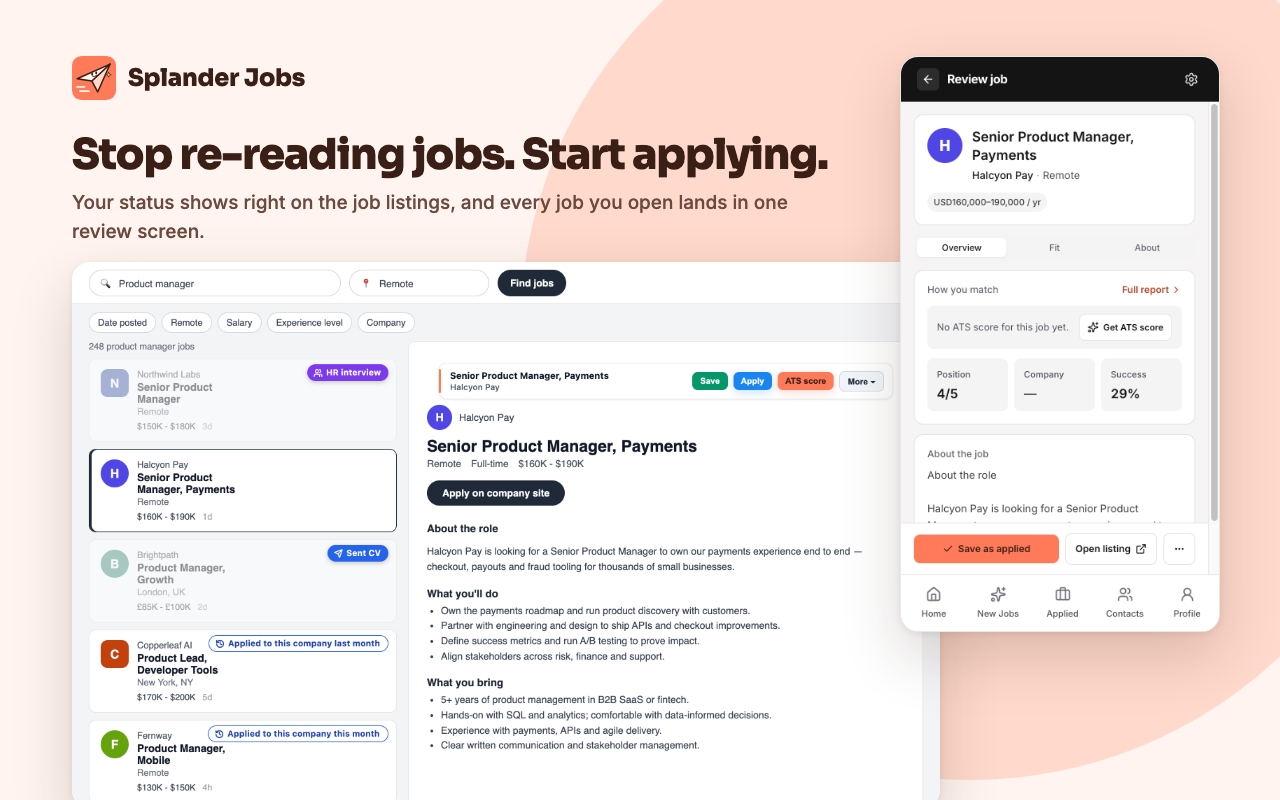
A job search spreads across tabs, job sites and a spreadsheet you forget to update. Splander Jobs puts a status pill on every job you've touched and keeps your whole search in one side panel, so you stop re-reading the same jobs.
A status pill on every job card
Browse LinkedIn, Indeed, Glassdoor, AllJobs, JobNet, JobFox and Jobify as usual. Each job card shows its status, like Sent CV, Interview, Offer or Rejected, so you see at a glance what you've applied to, saved or ignored.
- Sent CV
- CV received
- Interview
- Offer
- On hold
- Rejected
- Ignored
Save in one click
Save a job straight from the job page. If a role is reposted, Save again picks it up without starting over.

Everything you need to decide
Click any job to open it in the side panel: the role, your notes, and your history with this company.
Never lose track
Every job keeps its details, notes, salary terms and a full history of status changes.
The interface is available in English and Hebrew.
Questions, answered
- Which job sites does Splander Jobs work on?
- LinkedIn, Indeed, Glassdoor, AllJobs, JobNet, JobFox and Jobify. Every job you save goes into one tracker.
- Do I need an account?
- No. Tracking works without an account, and every job is saved in your browser. Signing in is optional and turns on free cloud sync across your devices.