Automate
Fill the form once. Let your inbox update your tracker.
Autofill for application forms, and optional, read-only Gmail updates that are read on your device.
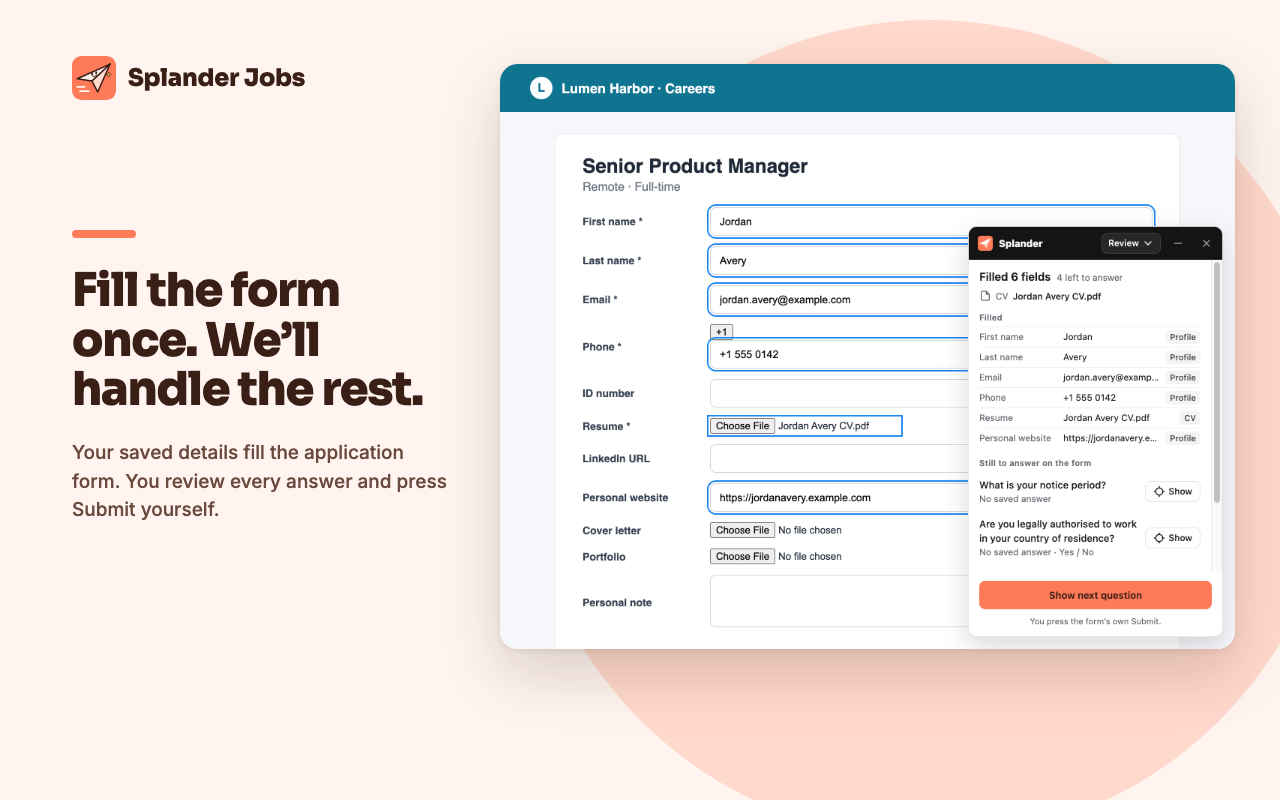
The slowest parts of a job search are typing the same details into every form and checking your inbox for replies. Splander Jobs fills the forms for you. If you choose to connect Gmail, it also moves each application forward when a reply arrives.
Fill the form once
Autofill puts your name, email, phone, profile links and the CV you chose into application forms on supported job sites and application systems, such as Greenhouse, Lever, Workable, Comeet and Workday.
You stay in control
By default, autofill fills the form and waits for you to review and submit. It never invents an answer to a question you haven't answered before.
Your inbox updates your tracker
Connect Gmail if you choose to. It's optional and read-only. Replies from recruiters and application systems move each application to CV received, interview, offer or rejection.
Read on your device
Emails are read on your device and never uploaded. If you sign in to sync, only the result syncs: an application's company, title and status. You can disconnect Gmail in Settings at any time.
The interface is available in English and Hebrew.
Questions, answered
- Does Splander Jobs read all my email?
- Only if you choose to connect Gmail, and only with read-only access. Emails are read on your device to match them to the jobs you track. The emails never leave your device. If you sync, only each application's company, title and status go with your tracker.
- Will it change anything in my Gmail?
- No. The Chrome Web Store version is read-only. It never sends, deletes or changes email.
- Does autofill submit applications for me?
- Not by default. It fills the form and waits for you to review it and press Submit.